
Buying Guide
Key Photocopier Specifications to Check Before You Buy
Speed, duty cycle, paper size, paper capacity, scanning and connectivity decide whether a copier suits your office. This guide explains the specifications that matter, what the numbers mean and what to look for.
By Innovative Infotech5 min readUpdated September 2026
Key takeaways
- Start with monthly volume, paper size and colour. They narrow the choice fastest.
- Compare the recommended monthly volume, not only the maximum duty cycle.
- If you scan a lot, the document feeder type and scan speed matter as much as print speed.
Monthly Print Volume and Duty Cycle
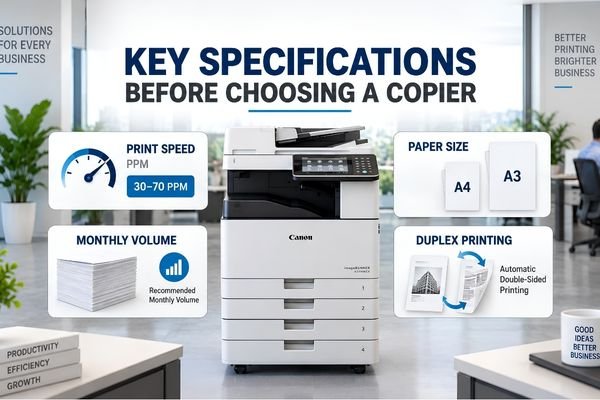
Before any specification, estimate how many pages you print and copy each month. Manufacturers quote two figures. The maximum duty cycle is the most the machine can handle in a month without damage. The recommended monthly volume is much lower and is the range the machine is designed to run in day after day. Choose a copier whose recommended volume covers your normal month with room to grow.
Print Speed (Pages Per Minute)
Speed is quoted in pages per minute (ppm) for A4 paper. As a rough guide, around 20 to 25 ppm suits a small office, 30 to 45 ppm suits a busy department, and 50 ppm and above suits print rooms and copy shops. Our range runs from 18 ppm on entry A3 models up to 70 ppm on the HP LaserJet Managed MFP E82670dn. See commercial and heavy-duty photocopiers for the fastest models.
Also check the first copy out time, how long the first page takes, and the warm-up time. In an office that makes many short copy jobs, these matter as much as ppm.
Paper Size: A3 or A4
An A4 copier handles paper up to A4 and is compact. An A3 copier also handles A3, and is usually built for more volume and more accessories. If you ever copy drawings, charts or ledgers, choose A3. Read what a multifunction photocopier is for more on A3 and A4 machines.
Paper Capacity and Paper Types
Check the standard paper capacity and the maximum with optional trays. The Kyocera TASKalfa MZ3200i, for example, holds 1,100 sheets as standard across two cassettes and a bypass tray. Look at the supported paper weight (gsm) if you print on card, labels or envelopes.
Duplex Printing and the Document Feeder
Automatic duplex prints on both sides of the paper and cuts paper use. For scanning and copying stacks, the document feeder matters:
- Reversing feeder (RADF): scans one side, flips the page and scans the other. Slower for two-sided originals.
- Single-pass duplex feeder (DADF): scans both sides at once. The Canon imageRUNNER 1643i II scans up to 70 images per minute two-sided this way.
- Feeder capacity: how many originals it takes in one go, commonly 50 to 150 sheets.
Scanning Features
Check the scan speed in images per minute (ipm), and the destinations: scan to email, to a network folder, to USB and to cloud services. Searchable PDF and colour scanning are useful for record keeping. Some black & white copiers still scan in colour.
Print Quality
Resolution is measured in dots per inch (dpi). Most office copiers print at 600 x 600 dpi or 1,200 x 1,200 dpi, which is sharp enough for text and business graphics. For colour marketing material, ask to see a sample print.
Connectivity and Mobile Printing
- Network (Ethernet): needed to share the copier across the office.
- Wi-Fi and Wi-Fi Direct: useful where cabling is difficult.
- Mobile printing: AirPrint and Mopria let staff print from phones and tablets.
- Printer languages: PCL and PostScript support helps with different computers and software.
Memory, Storage and Security
More memory handles large print jobs faster. Internal storage lets the machine hold scanned files and print jobs. Security features such as user login, department codes, secure print and encrypted storage protect confidential documents, which matters in legal, finance and healthcare offices.
Running Costs
Check the toner yield, the number of pages a cartridge prints at 5% coverage. The Canon imageRUNNER 1643i II's T06 toner, for example, is rated at about 20,500 pages. Divide the toner price by its yield to estimate the cost per page, and ask about the life of the drum and other wear parts. Colour pages cost more. Read colour vs black & white copiers.
Specification Checklist
| Specification | What to check |
|---|---|
| Monthly volume | Recommended monthly volume covers your normal month |
| Speed | ppm matched to your busiest periods, plus first copy out time |
| Paper size | A3 if you ever copy larger paper, otherwise A4 |
| Paper capacity | Enough trays that staff are not refilling all day |
| Document feeder | Single-pass duplex if you scan two-sided stacks |
| Scanning | Scan to email, folder and cloud, and scan speed in ipm |
| Connectivity | Network, Wi-Fi and mobile printing as needed |
| Security | User login and secure print for confidential work |
| Running cost | Toner yield and cost per page |
| Service | Local service, genuine spare parts and an AMC option |
Want a second opinion on a model?
Send us the model you are considering and your monthly volume. We will tell you if it fits, and compare it with others on our price list.
Key Specifications Before Choosing a Copier: FAQs
What is a good print speed for an office photocopier?
Around 20 to 25 pages per minute suits a small office, 30 to 45 ppm suits a busy department, and 50 ppm or more suits print rooms and copy shops.
What is the duty cycle of a photocopier?
The maximum number of pages a copier can handle in a month. The recommended monthly volume is lower, and it is the better figure to compare with your actual printing.
What is a single-pass duplex document feeder?
A feeder that scans both sides of a page at the same time, which makes two-sided scanning and copying much faster than a reversing feeder.
How do I work out the cost per page?
Divide the toner cartridge price by its rated yield in pages. Add a share of drum and other part costs for a fuller figure.
More Photocopier Guides

What Is a Multifunction Photocopier?
What an MFP does, its main parts and how it compares with a printer or a basic copier.
How Does a Photocopier Work?
The six steps of xerography, from charging the drum to fusing toner onto paper.
Photocopier Rental vs Buying
Upfront cost, monthly cost, service and ownership, side by side.
Talk to Our Photocopier Team
Tell us how many pages you print each month, the paper size and if you need colour. We will suggest a machine, a rental plan or a repair, and send you the price.